SKU: 65488697571
serrated philodendron

serrated philodendron Ring of Fire Plant

Sale price$19.45 Regular price$21.61
Save 10%

Pay in installments of $5.40 with ShopPay, AfterPay and Klarna

Shipping Estimate
USA
  • USA
  • CAN

Ships within 48 hours · Estimated delivery Jul 18 - Jul 23

Promo Codes Available:

For Your Every Summer RSVP, with Code: SUMMER15

Description

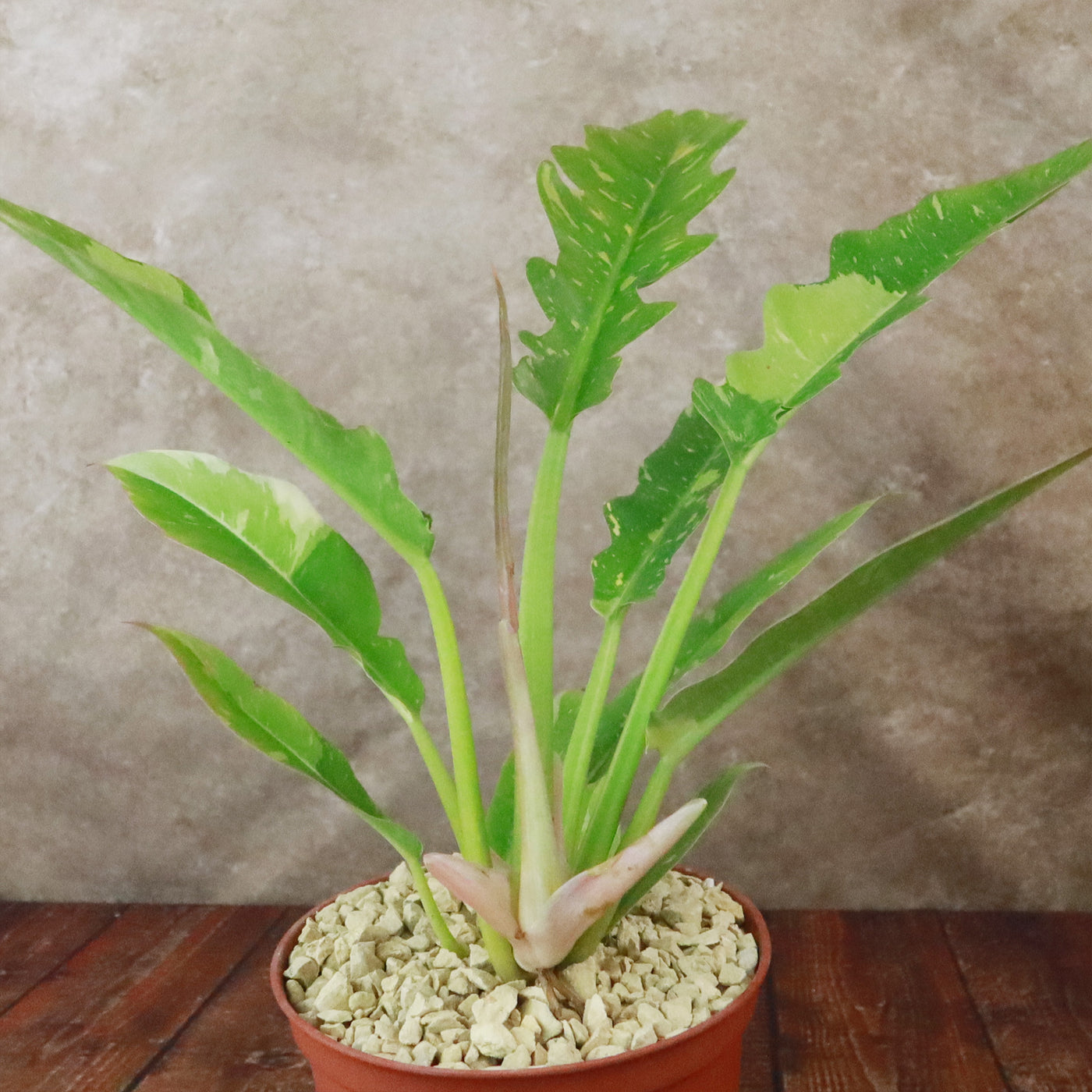
serrated philodendron Ring of Fire PlantKey Highlights Ring of Fire The Philodendron ring of fire plant is known for its long, serrated leaves with dramatic, jagged edges, making it one of the most unique philodendron varieties. The Philodendron Ring of Fire is a climbing variety that naturally grows upward, using aerial roots to attach itself to trees or moss poles for support. The foliage displays an ever changing mix of green, yellow, orange, cream, and white, with each new leaf

Key Highlights – Ring of Fire

  1. The Philodendron ring of fire plant is known for its long, serrated leaves with dramatic, jagged edges, making it one of the most unique philodendron varieties.
  2. The Philodendron ‘Ring of Fire’ is a climbing variety that naturally grows upward, using aerial roots to attach itself to trees or moss poles for support.
  3. The foliage displays an ever-changing mix of green, yellow, orange, cream, and white, with each new leaf developing unpredictable variegation over time.
  4. The Philodendron ‘Ring of Fire’ is expensive due to its slow growth rate, rarity, and highly sought-after variegation.
  5. Like many philodendrons, it helps improve indoor air quality by filtering toxins and increasing oxygen levels in the home.

The Ring of Fire Plant, known as Philodendron ‘Ring of Fire’, is a highly sought-after tropical plant known for its striking foliage and vibrant color variations. This hybrid variety with long, serrated leaves, display an incredible mix of green, orange, yellow, and cream hues. Its rarity and climbing nature make it a prized addition for houseplant collectors and enthusiasts who appreciate unique and ornamental foliage plants. It is also valued for its ability to purify the air in homes and offices.

No two leaves are exactly alike, with each new leaf emerging in different shades and patterns, adding to its appeal. This makes it an exciting plant to grow, as its appearance changes over time. 

It grows in a vining or climbing manner, making it an excellent candidate for moss poles or trellises that support its upward growth.

When mature, the Philodendron ‘Ring of Fire’ can grow up to 8 feet tall and with spreads up to 6 feet wide.

Although it is slow-growing, patience is rewarded with spectacular foliage that develops more defined variegation as the plant matures.

One of its most distinguishing features is its elongated, deeply serrated large leaves.

Unlike many philodendrons with smooth edges, Ring of Fire has dramatic, jagged margins that enhance its tropical and exotic look.

The variegation ranges from bright yellow and orange to deep green and creamy white, creating a fiery effect that justifies its name. 

The flowers appear on a thin stalk and look like tiny spikes with pale yellow or white petals. Since flowering is rare, it does not impact the plant’s appeal as a decorative houseplant. 

Another fascinating aspect of the Philodendron ‘Ring of Fire’ is its ability to display different color phases throughout its life. Some leaves may emerge predominantly green with subtle splashes of yellow, while others can have intense orange or creamy white streaks. This ever-changing variegation adds an element of surprise and uniqueness, making it a favorite among collectors who enjoy dynamic, evolving plants. 

When and How to Water Your Ring of Fire Plant 

Philodendron ‘Ring of Fire’ is a relatively drought-tolerant plant, but it should not be allowed to dry out completely. This plant can withstand brief periods of dryness, thanks to its semi-succulent roots, but prolonged drought will lead to slowed growth and leaf curling. While it doesn’t demand frequent watering like some moisture-loving plants, it is essential to balance hydration to prevent stress. 

In the spring and summer, during the active growing season, water your Philodendron 'Ring of Fire' when the top 2 inches of soil feels dry. Depending on the environment, this typically means watering once every 5 to 7 days. Ensure that you water thoroughly until excess drains from the pot’s bottom, allowing the roots to receive ample hydration.  

In fall and winter, during the dormant season, the ring of fire plant’s water needs decrease as growth slows. Water only when the top 3-4 inches of soil is dry, which may extend the frequency to once every 10 to 14 days. Overwatering during this time can lead to root rot, so always check soil moisture before watering. If the indoor air is particularly dry due to heating systems, occasional misting can help maintain humidity without overwatering. 

Light Requirements – Where to Place Your Philodendron Ring of Fire 

When grown indoors as a houseplant, your Philodendron ‘Ring of Fire’ thrives in bright, indirect light for at least 6 to 8 hours daily.

A spot near a north or east-facing window is ideal, where the plant receives filtered sunlight without harsh direct exposure.

South and west-facing windows should have sheer curtains to diffuse strong rays, as too direct sun can scorch the delicate variegated foliage.

If natural light is limited, supplement with a full-spectrum grow light for 10-12 hours daily to maintain healthy growth.

For outdoor cultivation, this Philodendron plant thrives in partial shade to dappled sunlight, making it perfect for placement under a tree canopy or a covered patio.

It benefits from morning sun exposure for at least 2-4 hours and shade during the hottest parts of the day. Avoid prolonged exposure to intense afternoon sun, as it can cause leaf burns, especially on the lighter variegated sections. 

Optimal Soil & Fertilizer Needs 

Philodendron ‘Ring of Fire’ thrives in well-draining, nutrient-rich soil. Planting them in ordinary soil will result in compacted roots, stunted growth, and most likely root rot. Instead, make or buy a well-draining potting mix, or ideally use our specialized potting mix, opens in a new tab that contains 5 natural substrates and mycorrhizae to promote the development of a strong root system that helps your Philodendron plant to thrive. 

During the growing season in the spring, fertilize the plant once a year using a balanced NPK fertilizer. A formulation with lower parts of nitrogen and potassium such as 5-10-5, will encourage strong foliage growth and vibrant variegation. Organic alternatives like worm castings or compost can also provide slow-release nutrients. 

In fall and winter, reduce feeding as the plant’s growth naturally slows. Over-fertilizing during dormancy can lead to salt buildup and leaf discoloration. 

Hardiness Zones & More 

For growing indoors as a houseplant, ring of fire Philodendron requires temperatures between 65-80°F and humidity levels above 60% for optimal growth. Placing a humidifier nearby or using a pebble tray can help maintain consistent moisture in the air. Avoid placing the plant near heating vents or air conditioners, as sudden temperature fluctuations can cause stress. 

In the United States, this is mostly an indoor plant, but if you live in southern Florida or

Hawaii then you can cultivate it outdoor in USDA zones 9-11.

It thrives in high humidity environments but should be sheltered from direct afternoon sun to prevent leaf scorch.

If you grow outdoors in cooler zones, bring the plant indoors once temperature drops below 55°F to prevent cold damage.

Some variegation patterns may intensify or change slightly in response to different light conditions. 

Wildlife – Ring of Fire Flowers Attracts the Following Friendly Pollinators 

The Philodendron 'Ring of Fire' attracts pollinators, such as bees, butterflies, and hummingbirds with its creamy white to pale yellow flowers. The plant's flower structure and fragrance make it attractive to a variety of pollinators.

Butterflies
Bees
Hummingbirds
Lady Bugs
Multi Pollinators
Other Birds

According to ASPCA, the Philodendrons are mildly toxic to cats, dogs, and birds due to the presence of calcium oxalate crystals. Ingesting any part of the plant can cause oral irritation, drooling, vomiting, and difficulty swallowing, so keep it out of reach of pets. 

How to Propagate Your Ring of Fire Philodendron  

Philodendron ‘Ring of Fire’ is best propagated by stem cuttings. Select a healthy stem with at least two to three nodes and cut just below a node using sterilized shears. Remove any lower leaves and place the cutting in water or a well-draining potting mix. If using water propagation, change the water every few days until roots develop, then transfer the cutting to soil. Keep humidity high and provide indirect light to encourage healthy root formation.

The Bottom Line 

Overall, the Philodendron ‘Ring of Fire’ is a remarkable plant that combines striking coloration, serrated leaves, and a slow but rewarding growth habit. It’s rare and unpredictable variegation makes it highly desirable, while its relatively low-maintenance care needs make it accessible to both beginners and experienced plant lovers. It thrives in bright, indirect light, well-draining soil, and high humidity, making it a fantastic choice for both indoor and outdoor plant enthusiasts in warm climates.  Whether used as a statement piece in a houseplant collection or allowed to climb in a tropical indoor garden, this philodendron continues to captivate plant enthusiasts worldwide. 

Shipping Notes
  • Free Standard Shipping on $100+ Orders to the USA.
  • Except Preorder products are shipped in 48 hours.
  • Delivery to the USA:
  1. Standard Shipping : 3-10 business days
  • If time is of the essence, please consider selecting expedited delivery for faster service.
Exchange/Return Notes
  • We offer a 30-day return/exchange service after receiving.
  • Final sale items are not eligible for returns or exchanges.
  • To process your return/exchange, please contact us at [email protected]
  • Please click here for more details>>> Return & Exchange Policy
SKU: 65488697571

Discover Niche Categories That Outsell serrated philodendron

Top-Converting Item to Boost Your Average Order

4.1 ★★★★★
Based on 29 reviews
Sort
Highest Rating
Newest First
Oldest First
Product Reviews
A
Verified Purchase
Aaron
Waukegan, US
★★★★★ 5
Great 10gbps USB-C Hub, worked with Anker support through compat issues with PD4 iteration 1
Original Review (updates below): ----- The moment I noticed this thing on Amazon, I bought it and it literally just arrived. Finally, 4K60 over just USB-C with other ports (including making up to 10Gbps available to them) for a reasonable price. Unfortunately, the first two things I've done with it were both disappointing. I'll cut to the chase, the power delivery pass through isn't working with one of their own chargers. The first device I tried connecting this with is my Anker PD4 with one USB-C cable as the only thing plugged into it so I can test the truly up to 100W (-15 for its own power) claims. I've tried connecting it with Apple's 2m USB-C charge cable (100w capable) and an equivalent CableMatters cable that also supports 100W. When plugged directly into my laptop, both of these cables immediately start charging it and show up as 100W power sources. When this Anker hub is plugged in and either of them is connected to the power delivery port on the side of it, the laptop does not charge (laptop is a 16" Macbook Pro, I've tried multiple ports just for the heck of it). My second complaint is that when absolutely nothing is plugged into it, it becomes fairly warm to the touch. Why, when it's doing nothing, is it hot? I'm clearly not running data or even power through it so I have low hopes for it under load. The fact that it doesn't work in exactly the scenario they want it to most (a MacBook Pro with one of their own chargers) seems like a pretty big fail. I've got lots of USB-C things though so I thought I'd grab a couple and try those. Using an Apple 96W USB-C charger, the device does pass through power delivery properly. It shows up as providing 79W to the laptop (siphoning off 17W in this instance). I also have a 56W Aukey charger that splits power between a USB-A port and a USB-C port that can provide 45W of power delivery. When plugged into that charger it does appear to work as well and appears in macOS as a 30W power source. Maybe the problem is the Anker PD4? But it works fine providing power to the laptop directly. Would love to hear from Anker about these two products working together and what I should actually expect. Having it be unreliable for power delivery isn't great, but power and heat aside (it is getting a little bit warmer now that it's providing power from the Apple power adapter, but still definitely holdable), the hardware looks and feels good and the cable feels durable. Worth also noting that there's a white LED ring on the side of it that appears to be always on when it's plugged in. Don't know why it needs an LED. ----- Update, June 22, 2020: I've done some more testing and Anker has reached out to me to investigate what might be the issue. I can say that the hub works as I would expect from a quick test with my iPad Pro 11" with the above functioning chargers. It was able to pass through power with the 96W Apple Charger on the other end to both the iPad port as well as a Magic Keyboard port. The ethernet adapter showed up in iOS settings and an external drive was functional. When connected via the Magic Keyboard, which is a power only connection, as expected it provided only power. Still no power passthrough of any kind when connected to the PD4. ----- Update July 1, 2020: I've written back and forth with Anker and they've sent me a replacement hub. It also doesn't work with the PD4. I've tried multiple USB-C cables but they have also shipped a cable to test with it. For now I'm increasing the review from 2 to 3 stars because I am more and more suspicious about the PD4 and less about this hub. They claim that they have tested the setup I have separately without issue, and I've sent video showing the problems I've encountered, so the troubleshooting is ongoing. Have had a chance to use Ethernet on it without issue. Still need to try to test out its throughput when trying to use a 10Gbps USB-C enclosure and a 4K60 monitor at the same time (+ ethernet). More updates to come. ----- Update July 10, 2020: I've continued to talk with Anker support and they shipped me a replacement PD4. The one I had was labeled as "Iteration 1" on its barcode, the one I got back was labeled "Iteration 2". I tested it out and it works perfectly with this hub, passing through the correct amount of power to multiple Macbook Pros and fast charging an iPad Pro. Clearly the fault doesn't lie with this hub and is instead an issue with the first iteration PD4, so I'm updating my review accordingly. Working with Anker support was great. I've also been able to test USB-C throughput (without driving a display as well so far) and it properly utilizes 10Gbps. I've attached some extra images showing various devices connected to it (keyboard dongle, SD card, USB-C 10Gbps external SSD enclosure, USB sound card, ethernet).
WAS THIS REVIEW HELPFUL?YesReportShare
Reviewed in the United States on June 19, 2020
J
Verified Purchase
Juan Muratalla
Houston, US
★★★★★ 5
Excellent Quality and Reliable Performance from Anker’s 8-in-1 USB-C Hub
I’m really impressed with this Anker USB-C Hub with Ethernet (8-in-1). The build quality feels premium, setup was completely plug-and-play, and all ports work flawlessly with my laptop. The Ethernet connection is stable and fast, which has been perfect for work calls and large file transfers. I also love how compact and portable it is while still offering plenty of connectivity options. HDMI output looks great, USB ports transfer quickly, and the SD card reader is very convenient for photo and video work. Anker continues to deliver reliable products, and this hub is no exception. Highly recommended if you need a dependable all-in-one USB-C hub for productivity or travel.
WAS THIS REVIEW HELPFUL?YesReportShare
Reviewed in the United States on May 20, 2026
T
Verified Purchase
Tommy
Phoenix, US
★★★★★ 5
Works great (quick test)
Just got this and tested and works great I attached to my MacBook with Ethernet and had a solid connection I tested my steam deck by plugging in Ethernet then adding HDMI then adding power and everything worked as it was plugged in I tested my Nintendo switch even though it clearly states it's not supported and it did not work at all. Even the power pass through did nothing. This is not even remotely a problem since it was advertised as such but I figured it was with a try and worth noting
WAS THIS REVIEW HELPFUL?YesReportShare
Reviewed in the United States on May 31, 2026
K
Verified Purchase
kunoh
Lexington, US
★★★★★ 4
Despite some caveats; this is a versatile hub
The Anker 555 8-in-1 USB-C Hub is a good buy if you’re looking for a hub from a reputable brand. I use it with an M1 Macbook Air, and it has been reliable so far. This hub has the following ports: 1 USB-C data port, 1 USB-C Power Delivery Port, 2 USB-A data ports, 1 HDMI port, an Ethernet port, and a microSD/SD card reader. Charging, PD (Power Delivery): To keep my Macbook charging, I connect a PD (Power Delivery) capable cable to the USB-C port meant for PD. (The other USB-C Port on this hub is meant only for data.) Once connected, the hub will eventually become warm to the touch, but this hasn’t caused any problems so far. Video Performance - no problems in 1440p I can connect my 1440p 144hz monitor to this hub’s HDMI port and my Macbook Air has no problem outputting a refresh speed of 144hz, as well the lower refresh rates of 120hz and 60hz. (I do not have a 4k monitor, so I could not test that.) USB-A Ports - works flawlessly I’ve tried keyboards, USB Drives, and even gaming Mice. All of these devices work as expected when connected to the USB-A Ports. Ethernet - Excellent speed I've connect this hub using an Ethernet cable to Gigabit speed Internet. The speed is just as fast as other computers on the network, and there is no slowdown at all, even with most of the ports on the hub being used. Gaming Keyboards with USB-C connectors - some issues. Some peripherals such as keyboards with USB-C connectors may not work on the USB-C ports on this hub. I tried using a Glorious GMMK Mechanical Keyboard and it did not work with this hub’s USB-C ports. (Of course you could try to simply use a USB-C to USB-A adaptor and then connect via the other USB ports on the hub instead.) Extension Cable - Use a Thunderbolt 4 cable Although this is totally optional, I like to use a small, 6-inch USB-C Extension cable to allow this hub to have more slack away from my laptop when connected. To allow this to work, I had to use a Thunderbolt 4 extension cable. I've tried other cables such as a Thunderbolt 3 extension cable. However, some of the attached devices on the hub were not recognized. Only the the Thunderbolt 4 extension cable allowed all my attached devices to be recognized. Other devices I have successfully connected an external SSD via the USB-C data port on this hub. I also regularly use an external DAC using the USB-A ports connecting to an IFI HIP DAC. Both of these devices work perfectly with this hub. Data transfer speed is rated at 10Gbs, though I haven't actually confirmed that. It works well enough for my purposes of transferring text documents and the occasional batch of vacation photos to my external SSD. Conclusion This hub from Anker is rated at 10Gbs which is plenty for me. But if you regularly transfer large amounts of data (like for video editing), I would instead recommend a powered docking station such as those from CalDigit. But for me, this portable hub does everything I need, and for much less money.
WAS THIS REVIEW HELPFUL?YesReportShare
Reviewed in the United States on January 28, 2023
S
Verified Purchase
SamCat
Draper, US
★★★★★ 5
Almost perfect, could use one more USB-C Gen 2 port and a metal case instead of plastic.
Never really had any problems with Anker gear, I've come to trust the brand name. This little hub is almost perfect for use with my 2019 MacBook Pro, but where Anker really dropped the ball is by not adding one more USB-C port. I mean, there's two, but if one is dedicated to power devices only that doesn't really leave much room for expansion by only giving you one extra, I mean they were thoughtful enough to give you two USB-A ports. I do like that the USB-C and two USB-A ports are version 3.2 Gen 2 rated for up to 10Gbps transfer speeds versus Gen 1 at 5Gbps. The plastic casing does get hot, not sure if aluminum metal would be any better, but it would feel nicer, plastic just feels cheap. Also, a dark case with dark letter printing doesn't work because you can't see the writing, should have used lighter letter coloring. Otherwise, solid performer. I'll keep it along with my other one because having two hubs with a laptop is convenient so I don't have to always haul a hub around from place to place. PROS: • 1 USB-C port version 3.2 Gen 2 rated up to 10Gbps. • 2 USB-A ports version 3.2 Gen 2 rated up to 10Gbps. • Also includes, HDMI, Ethernet, SD and micro SD card ports. CONS: • Plastic casing, gets hot. • Should have one more USB-C port. • Port description lettering is too dark, gets lost against dark case color, should have used white or silver lettering instead. • No audio port.
WAS THIS REVIEW HELPFUL?YesReportShare
Reviewed in the United States on May 7, 2024

recommand products